


How to Turn Off Data Selling in Roblox
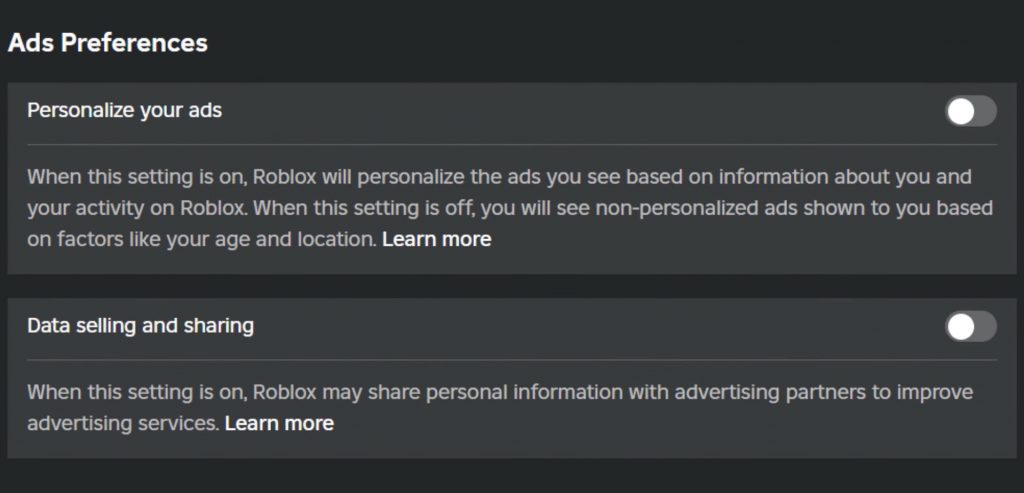
In a recent update, Roblox introduced new data collection practices, which involve sharing user data with advertisers. This change, effective from August 7th, 2023, has raised concerns among players, especially regarding privacy. Fortunately, Roblox has provided options within its settings that allow users to control how their data is processed and shared. If you prefer to maintain your privacy and limit data sharing, follow this guide to turn off data selling in Roblox.
Guide to Turn of Data Selling in Roblox
Step 1: Access Your Roblox Settings
To begin, log in to your Roblox account on your preferred device. Once logged in, locate the settings icon, which is usually represented by a gear symbol, often found in the upper right corner of the screen. Click the screw icon to open settings menu.
Step 2: Navigate to Privacy Settings
Within the settings menu, look for the “Privacy” tab. This section contains various options related to how your personal data is managed on the platform. Click on “Privacy” to proceed.
Step 3: Adjust Ad Preferences
In the Privacy settings, scroll down until you find the section labeled “Ad Preferences.” This is where you can control whether or not Roblox can use your data for personalized advertisements. Look for the option “Personalized Ads,” and if it is turned on, click to switch it off. This will prevent Roblox from using your in-game activities, such as the games you play or the items you purchase, to target you with specific ads.
Step 4: Disable Data Sharing
Continuing in the Privacy section, find the option related to data sharing. Data Settings or Sharing or Something similar might be labeled there. Ensure that this setting is also turned off. By disabling data sharing, you reduce the likelihood that Roblox will share your information with third-party advertisers.
In today’s digital age, it’s important to stay vigilant about how your data is used online. Roblox’s introduction of data sharing and personalized ads is part of a broader trend seen across many online platforms.
While these settings provide some control, it’s a reminder that user data is a valuable commodity. Regularly checking your privacy settings on all platforms can help you maintain control over your personal information. If you’re uncomfortable with these changes on Roblox, consider adjusting these settings as described to better protect your privacy.
GuideRoblox