


Bizarre Lineage Reset Stat Guide – How to Reset Your Stats Easily!
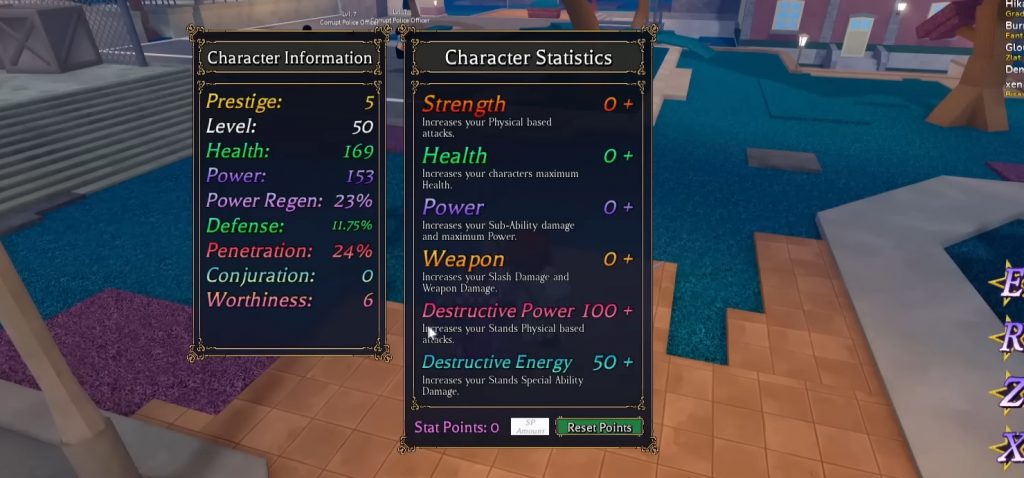
Building your character in Bizarre Lineage requires careful planning, especially when distributing stat points. Every stat affects how your character performs in combat, whether you focus on Stand abilities, sub powers like Vampire or Hamon, or even weapon-based attacks. Because of this, placing points incorrectly can make your build much weaker than expected.
Many players realize their build is not optimal after progressing further in the game. Sometimes the damage feels too low, survivability becomes an issue, or the stats simply do not match the Stand they are using. When this happens, resetting your stats becomes the best solution so you can rebuild your character properly.
This guide explains how to reset stats in Bizarre Lineage, where to find the NPC, and the methods you can use to fix your build. Also check out our Bizarre Lineage Codes for more rewards!
Why You Might Need to Reset Your Stats
There are several reasons why players choose to reset their stat points in Bizarre Lineage. Since the game allows many different builds, beginners often experiment with different stat distributions. Common reasons players reset their stats include:
- Placing too many points into the wrong stat
- Switching to a new Stand that requires a different build
- Testing a better PvE or PvP setup
- Fixing a build that deals low damage
Resetting stats allows you to redistribute all your points again, giving you the chance to optimize your character.
How to Reset Stats in Bizarre Lineage
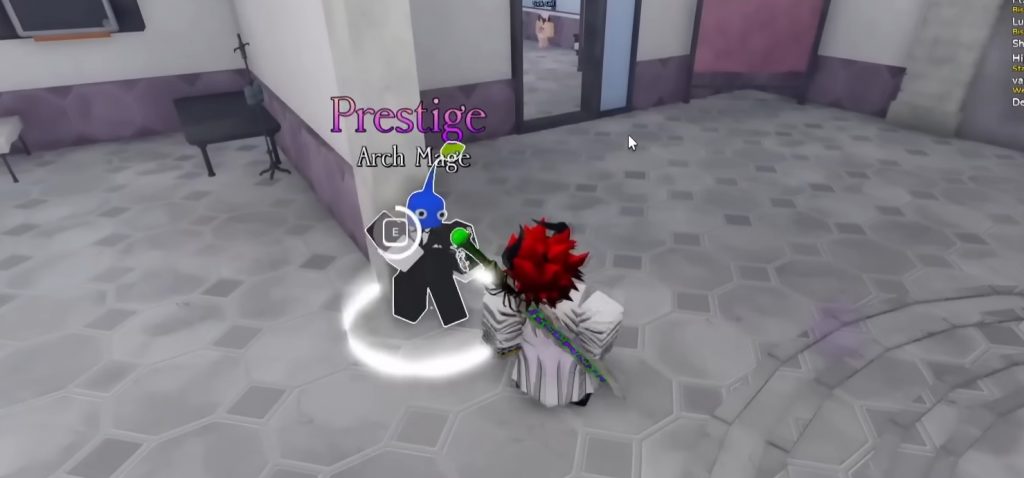
Resetting your stats requires a special item called Stop Essence, which can be purchased from an NPC. Follow these steps to reset your stat points.
1. Go to Bus Stop 10
First, travel to Bus Stop 10, which is one of the locations where important NPCs can be found.
2. Find the Arch Mage NPC
Once you arrive, look for the Arch Mage NPC. This character is responsible for selling items related to stat resetting.
3. Buy Stop Essence
Talk to the Arch Mage and purchase Stop Essence.
The item costs 1 shard, which is the currency required for this purchase.
4. Use Stop Essence
After buying the item, use Stop Essence from your inventory. Once activated, all your stat points will be reset and returned so you can distribute them again. This allows you to rebuild your character based on the build you want.
Alternative Method: Reset Through Prestige
Another way to reset your stats is by prestiging your character. When you prestige, your level resets and you stArch leveling again. During this process, you will naturally redistribute your stat points as you progress. Some players prefer this method because it allows them to rebuild their character without spending shards. However, prestiging takes more time since you must level your character again from the beginning.
Tips Before Resetting Your Stats
Before resetting your build, it is a good idea to plan your new stat distribution carefully. Here are a few useful tips:
- Understand your Stand scaling Some abilities scale with Destructive Power while others scale with Destructive Energy.
- Do not waste points on unnecessary stats Stats like Strength or Weapon are usually not needed for Stand builds.
- Keep enough health Having around 20–25 points in Health is usually enough for survivability.
Planning your build first will help you avoid needing another reset later.
Resetting stats in Bizarre Lineage is a simple but very useful feature for players who want to improve their builds. Whether you placed points incorrectly or switched to a different Stand, the reset system allows you to fix your character without stArching over completely.
By purchasing Stop Essence from the Arch Mage at Bus Stop 10, you can quickly reset your stats and redistribute them based on your preferred playstyle. Alternatively, you can also reset your build through the prestige system if you do not want to spend shards. With the right stat distribution, your character will perform much better in both PvE and PvP, making it easier to progress through the game and defeat stronger enemies.
Bizarre Lineage