


Bite by Night How to Complete Medal Event Quest & Unlock Medal Fighter Skin
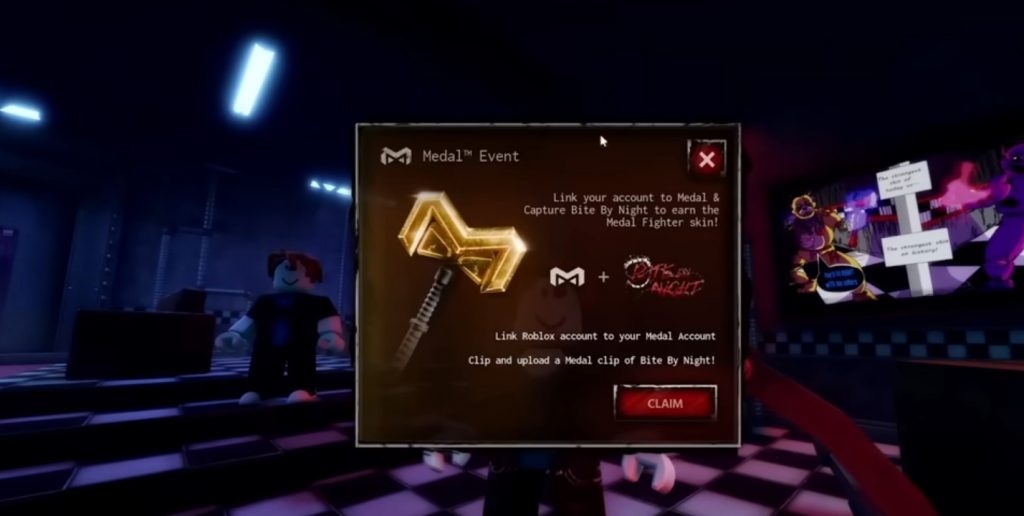
Getting the Medal Fighter Skin in Bite by Night is actually much easier than it looks, but a lot of players get stuck because they miss one small step. The event requires you to connect your account and record gameplay using Medal, and if everything is done correctly, you can claim the reward almost instantly. This guide will walk you through the full process step by step so you don’t miss anything and can unlock the skin without any issues.
- Also check out our Bite By Night Beginner Guide!
- Bite by Night Codes
Step 1 – Download and Install Medal
Before you can start the quest, you need to install the Medal app on your PC. This is required because the event is tied directly to recording gameplay through Medal.
- Download Medal from its official website
- Install the application and open it after setup
- Make sure it runs properly in the background
Once installed, Medal will automatically detect games like Roblox when you launch them. This is important because the quest depends on Medal recognizing your gameplay session correctly. If the app is not running, the quest will not progress even if you play normally.
Step 2 – Link Your Roblox Account
After installing Medal, the next step is linking your Roblox account. This is required so the system knows where to send the reward.
- Open Medal and go to login options
- Choose “Other Options”
- Select login with your Roblox account
- Complete the login process
This step ensures that your progress in the quest is tied directly to your Roblox profile. Without linking your account, you won’t be able to claim the Medal Fighter Skin even if you complete the recording requirement.
Step 3 – Record a Clip in Bite by Night
Once everything is linked, you need to capture gameplay footage from Bite by Night using Medal.
- Launch Roblox and enter Bite by Night
- Play the game for at least 30 seconds
- Press F8 on your keyboard to record the last 30 seconds
Medal works by saving recent gameplay, so you don’t need to manually start recording. Pressing F8 will automatically capture your last 30 seconds. This is the main requirement of the quest, so make sure the clip is successfully recorded.
Step 4 – Upload the Clip to Medal
Recording alone is not enough—you also need to upload the clip.
- Open Medal after recording
- Find your saved clip
- Upload it through the app
Uploading confirms that you completed the “capture gameplay” part of the quest. If you skip this step, the quest will not register as completed.
Step 5 – Claim the Medal Fighter Skin
After uploading your clip, you should be able to claim your reward.
- Go back to the quest page in Bite by Night
- Click the Claim button
- Receive the Medal Fighter Skin
If everything is done correctly, the reward should unlock immediately. This completes the entire event quest.
The Medal event quest in Bite by Night is straightforward once you understand the steps. The key is linking your account correctly and making sure your gameplay clip is both recorded and uploaded. Most problems happen when one of these steps is skipped. Follow this guide carefully, and you should be able to unlock the Medal Fighter Skin in just a few minutes without any trouble.
Bite By Night