


Overclocked Guide – Best Builds, How to Get Tokens, Tips & Tricks
Overclocked can feel extremely confusing when you first start playing. The game throws dozens of components, wires, upgrades, and systems at you almost immediately, and many players end up making weak setups without understanding why their income is low.
The main goal in Overclocked is to build a digital processing network that downloads files, cleans them, sells them, and turns everything into profit. As you progress, your setup becomes bigger, faster, and much more automated. This guide explains the basics, the best beginner builds, how tokens work, and several important tricks that will help you progress much faster.
How Overclocked Works
At its core, Overclocked is all about creating a production chain. Every component has a specific job, and your network only works properly when every part is connected correctly.
A basic setup usually looks like this:
- Network
- Downloader
- Virus Scanner
- Virus Cleaner
- Seller
- Collector
The Network provides download and upload speed. Downloaders generate files, the virus tools clean them, the Seller converts them into money, and the Collector stores your earnings. Once you understand this loop, the game becomes much easier to manage.
Best Beginner Setup in Overclocked
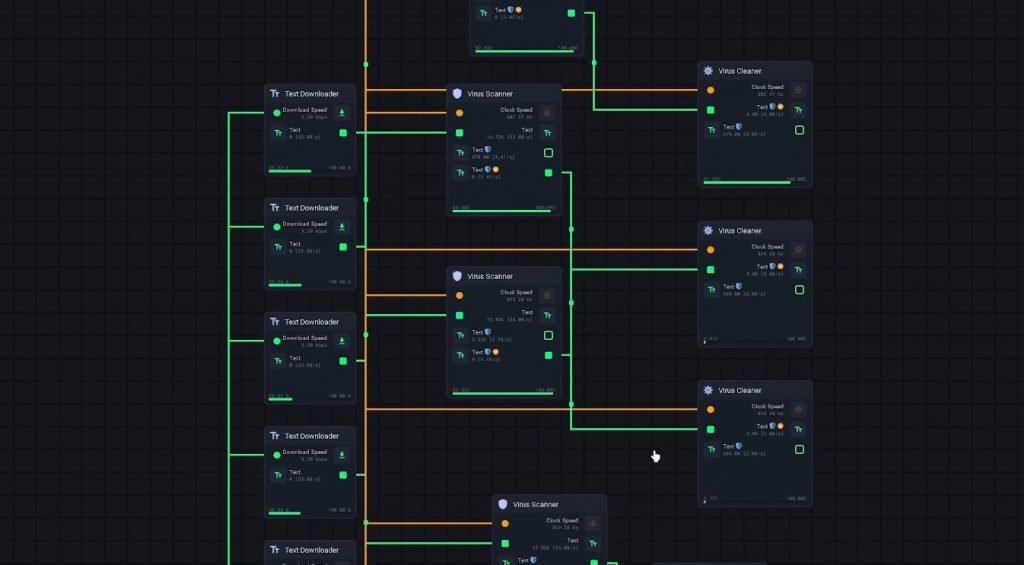
When starting out, you should focus on building a very simple but efficient setup instead of placing random components everywhere. Your first setup should look like this:
- Place a Network
- Connect download speed to a Text Downloader
- Connect upload speed to a Seller
- Connect the downloaded text to the Seller
- Connect the Seller to a Collector
This creates your first money-making system.
At the beginning, Text Downloaders are perfectly fine. You mainly want to focus on understanding the wiring system and earning enough money to unlock stronger components.
Why Virus Scanners Are Important
A lot of new players completely ignore Virus Scanners and Virus Cleaners, which slows progression massively. Every downloaded file contains viruses. If you sell infected files, you lose potential value. Virus systems clean those files and increase the amount of money you earn. The proper chain should look like this:
Downloader → Virus Scanner → Virus Cleaner → Seller → Collector
This simple change can increase profits by a huge amount over time.
Always Use Separate Virus Scanners
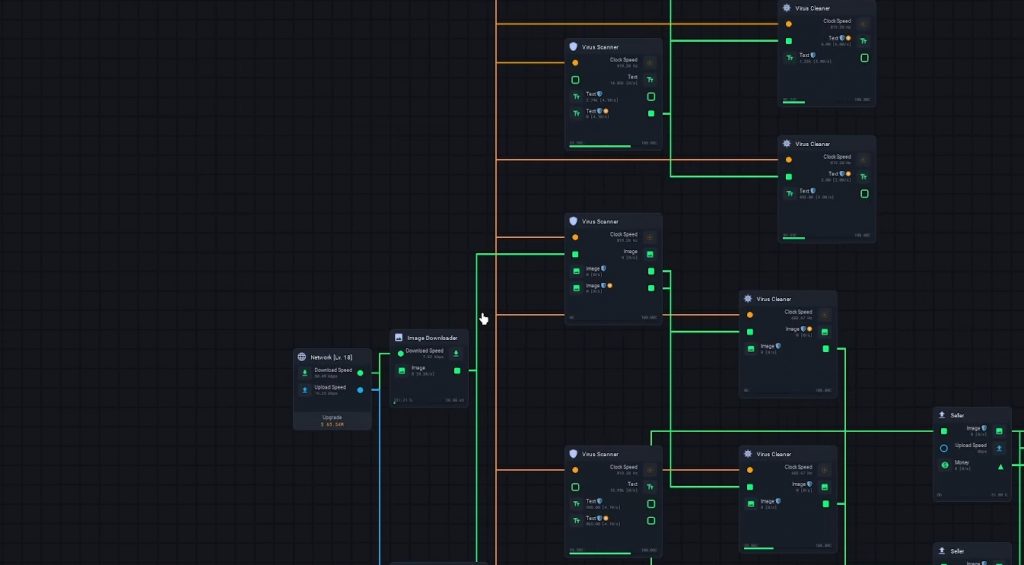
One of the biggest beginner mistakes is sending multiple downloaders into the same Virus Scanner. That setup is inefficient. Instead, every downloader should have its own dedicated Virus Scanner and Virus Cleaner. This keeps processing speeds high and prevents bottlenecks inside your network. A better setup looks like this:
- Text Downloader 1 → Scanner 1 → Cleaner 1
- Text Downloader 2 → Scanner 2 → Cleaner 2
- Text Downloader 3 → Scanner 3 → Cleaner 3
After that, everything connects into one Seller and then into the Collector.
This is much faster and scales far better in the late game.
How CPUs Work
CPUs are required for components that need clock speed. Without CPUs, advanced systems like Virus Scanners and Virus Cleaners will not work properly. You need to:
- Place a CPU
- Connect clock speed to your scanner systems
- Make sure every scanner has enough power
The better your CPU production becomes, the more advanced your automation setup can get.
Best Way to Make Money Fast
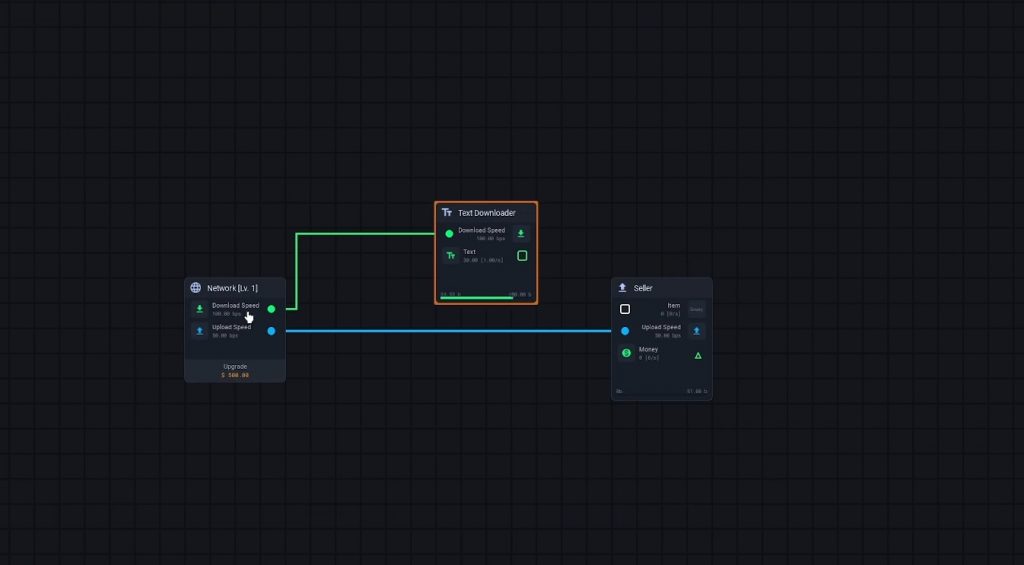
The fastest way to increase income is by upgrading your Networks as early as possible. Network upgrades improve:
- Download speed
- Upload speed
- Overall efficiency
Higher bandwidth means faster file generation, which directly increases profit. Many players notice huge jumps in income after upgrading Networks several times. A basic setup can suddenly jump from low earnings to hundreds of thousands per second.
Task Workers Explained
Task Workers are another important income source. These components use CPU power to generate extra money automatically. Once connected correctly, they work alongside your downloader setup and provide passive income.
- The setup is simple: CPU → Task Worker → Collector
This becomes very useful later in the game when your CPU production gets stronger.
Best Upgrades to Unlock First
As you progress, you unlock stronger systems through the Upgradables section.
Some of the most useful upgrades include:
- Image Downloaders
- Sound Downloaders
- Video Downloaders
- Crypto Market
- Advanced File Systems
You should replace weaker downloaders whenever possible.
For example:
- Stop using Text Downloaders once Image Downloaders unlock
- Replace Image Downloaders later with stronger systems
Better downloaders generate more valuable files and increase profit dramatically.
How to Get Tokens in Overclocked
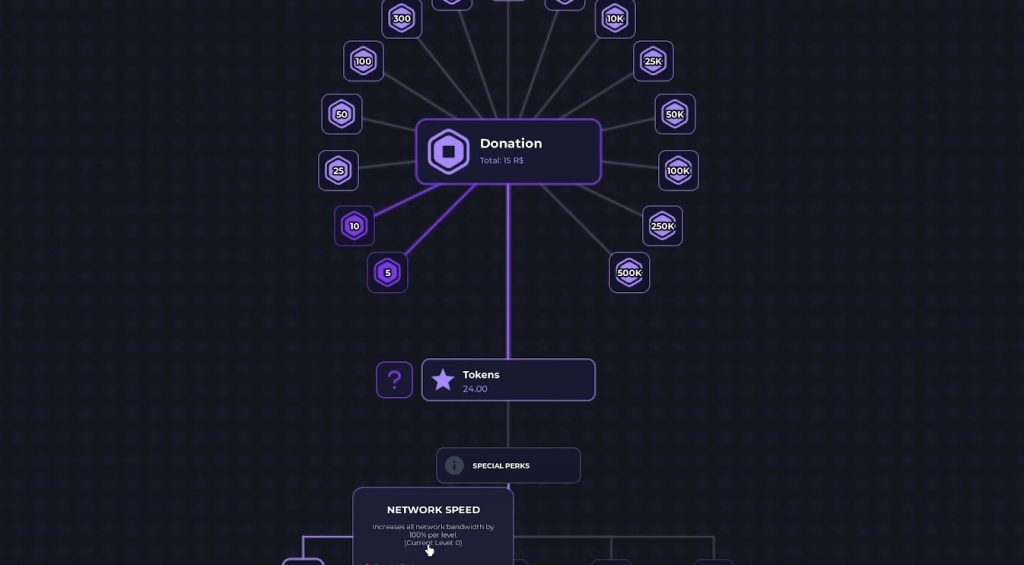
Tokens randomly appear around your setup while playing. When a token spawns, you only have a short amount of time to click and collect it. Many players completely miss this feature. You can also gain additional tokens through certain actions like donations or progression rewards. Because tokens disappear quickly, you should always pay attention while building your network.
Best Token Upgrades
Tokens can be spent on permanent upgrades that massively improve progression. Some of the best upgrades include:
- Network Speed This increases all network bandwidth production and is one of the strongest upgrades for beginners.
- Clock Speed Clock Speed boosts CPU-related production and helps advanced systems run faster.
- Money Gain This upgrade directly increases all money earned and scales extremely well in the late game.
- Research Gain Helpful for unlocking progression systems faster.
For beginners, Network Speed and Money Gain are usually the best first choices.
Best Mid Game Build
Once you unlock stronger components, your setup should start looking more organized and specialized.
A good mid-game layout includes:
- Multiple Networks
- Network Mixers
- Image or Video Downloaders
- Separate Virus Scanners
- Separate Virus Cleaners
- File Checkers
- File Fixers
- Sellers
- Collectors
The main goal is to process every file individually before selling it.
Efficient processing chains always outperform messy shared systems.
End Game Build Tips
Late-game builds become extremely large, but the core idea stays the same.
Your ideal setup should:
- Use stronger downloaders only
- Remove outdated Text Downloaders
- Give every downloader its own cleaning chain
- Upgrade Networks constantly
- Expand CPU production
- Optimize file processing speed
Once Video Downloaders and advanced systems unlock, your profits will increase much faster than early-game setups.
At that point, organization matters more than simply placing extra machines.
Overclocked has a steep learning curve, especially for new players who are unfamiliar with automation games. However, once you understand how the processing chains work, progression becomes much easier and much more satisfying.
The most important thing to remember is that clean and efficient systems will always outperform random setups. Keep upgrading your Networks, use separate Virus Scanners for every downloader, and slowly replace weaker components with stronger ones as you progress. Once everything starts working together correctly, your digital empire grows surprisingly fast.
Overclocked