


How To Withdraw Robux in Stonks Roblox
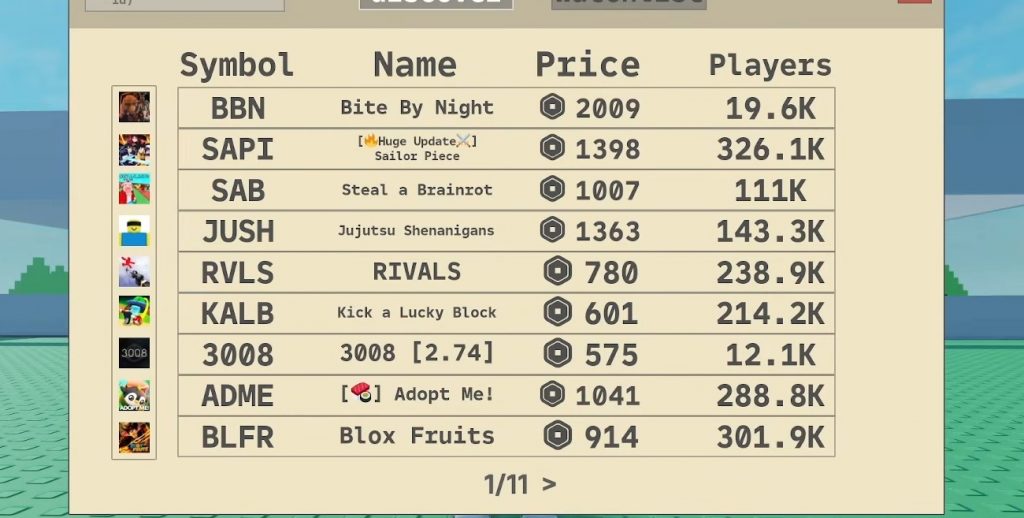
Making Robux in Roblox games is always exciting, and one of the games that lets players try this is Stonks. In this game, players can invest points into shares and later try to cash them out for Robux. While the system looks confusing at first, the process is actually pretty simple once you understand where everything is located.
If you are new to the game and wondering how players sell shares for Robux, this guide will walk you through everything you need to do. From buying shares to creating a Game Pass and listing your order, here is the full beginner guide for withdrawing Robux in Stonks Roblox.
How To Buy Shares in Stonks
The first thing you need to do is open the Invest menu inside the game. Once you are there, look for the Price option and click it. This will sort all available shares from the most expensive to the cheapest.
After sorting the list, choose a stock that you want to invest in. You will need points to buy shares, so make sure you already have enough saved up before purchasing anything. Once you find the share you want, press the Buy button and confirm the amount of shares you want to purchase.
A useful tip here is to add the stock to your Watch List. This makes it easier to keep track of the stock later, especially if you are waiting for the value to rise before selling it for Robux.
How To Sell Shares for Robux
Once you own shares, you can start the cash out process. Open the share you purchased and select the Sell for Robux option. The game will then ask how many shares you want to sell.
The amount of Robux you can request depends on the value of the share. For example, if the share price rises over time, you may be able to ask for more Robux than when you first bought it.
However, before you can complete the sale, you need to create a Roblox Game Pass because buyers will use that Game Pass to send the Robux payment.
How To Create a Roblox Game Pass
To create a Game Pass in Roblox, follow these steps carefully:
- Open the Create section on Roblox.
- Go to Creations.
- Select any game you own.
- Open the Passes section.
- Create a new Game Pass.
- Upload any image and save it.
After creating the Game Pass, open its settings and go to Sales. Enable selling and set the exact Robux price that matches your Stonks order. If your order is for 100 Robux, your Game Pass must also cost exactly 100 Robux.
This part is important because incorrect pricing may cause the listing not to work properly.
How To Find the Game Pass Asset ID
After creating the Game Pass, you will need its Asset ID. You can find this number in the Game Pass URL. Simply copy the ID from the link.
Go back into Stonks and paste the Asset ID into the selling section. Once done, confirm the order and your shares will officially be listed for sale.
You can also check your active orders through the Orders menu inside the game. If needed, you can cancel the listing anytime before someone buys it.
Important Things To Remember
There are a few important things players should know before trying to withdraw Robux in Stonks:
- You only receive Robux if another player buys your listed shares.
- Some shares may sell quickly while others can take a long time.
- Your Game Pass price must exactly match the order price.
- Expensive or popular shares usually have better chances of selling.
- Using the Watch List helps you monitor good investment opportunities.
Because the market depends on player activity, patience is very important when trying to cash out successfully.
The Robux withdrawal system in Stonks may seem complicated at first, but it becomes much easier after your first successful sale. The main idea is simple: buy shares using points, create a Game Pass with the correct price, and wait for another player to purchase your listing.
If you spend time learning how the market works and keep track of valuable shares, you can slowly build up more Robux over time. Just remember that selling shares is not instant, so choosing the right investments and being patient can make a big difference.
RobloxStonks