


How to Unlock Black Elk in Game of Thrones: Kingsroad Guide
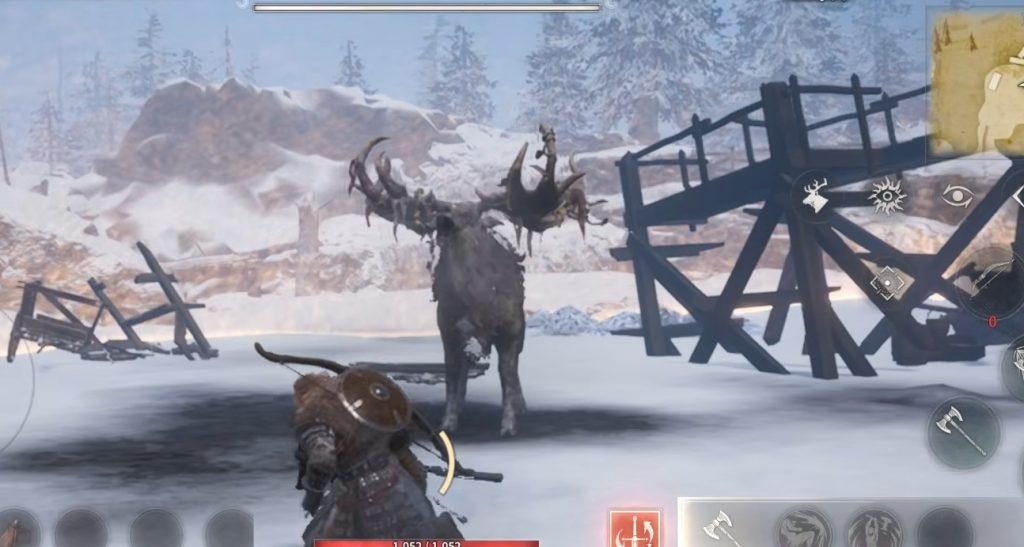
Game of Thrones: Kingsroad has finally arrived on mobile for SEA players, and many players are now trying to unlock special world bosses like the Black Elk. This giant beast is tied to side quests and daily missions, making it an important enemy to hunt if you want extra rewards and materials.
Unfortunately, the mobile version currently feels quite heavy even on strong devices. Many players are reporting lag, stutters, and frame drops while exploring cities or fighting bosses.
Still, if you can deal with the performance issues, the game itself is surprisingly fun and addictive for fans of open-world action RPG games. In this guide, we will explain how to unlock the Black Elk boss, where to find it, and a few important tips for smoother gameplay on mobile.
How to Unlock Black Elk Boss Fight!
To unlock the Black Elk boss, you first need to progress through the story until you reach the Lazard area. Once you arrive there, a side quest called “Steel and Bond” will become available. This side quest is extremely important because it introduces players to the beast hunting system in the game. After unlocking the quest:
- Speak to the NPC connected to the “Steel and Bond” mission.
- Follow the quest marker to the designated location.
- Use teleportation to travel faster if available.
- Continue progressing through the quest objectives.
Eventually, the game will guide you toward the Black Elk encounter.
How to Summon the Black Elk
The Black Elk is not just a random boss fight. This creature is connected to daily missions such as “Ferocious Beast.” Later in the game, you will also encounter other dangerous beasts like wolves and bulls. Defeating these enemies gives useful rewards and materials that can help improve your progression. Because of this, unlocking beast hunts early is highly recommended.
Before fighting the boss, players must prepare bait materials first. During the quest, you will gather crafting materials used to create bait for wild beasts. This mechanic works similarly for other beast bosses in the game as well. After collecting the required items:
- Open the crafting section.
- Create the bait item.
- Travel to the Black Elk hunting area.
- Use the bait to summon the boss.
Once summoned, the Black Elk battle will begin immediately.
Combat Tips Against Black Elk
The fight itself is not too difficult once you understand the attack patterns. However, lag can make dodging much harder on mobile. A few useful tips include:
- Dodge immediately whenever red attack indicators appear.
- Switch weapons if your current setup feels too slow.
- Lower graphics settings if performance becomes unstable.
- Use lock-on and enemy detection features to track hidden enemies and materials nearby.
The game also includes a detection ability that highlights enemies, hidden chests, and gathering materials through walls, which is very helpful during exploration.
Rewards from Black Elk
After defeating the Black Elk, players can spend RP or stamina to claim rewards. Possible rewards include:
- Beast materials
- Crafting items
- Blueprints
- Exchange materials for NPC shops
The materials earned from beast hunts can later be traded with the NPC responsible for creating beast bait.
Game of Thrones: Kingsroad on mobile currently has noticeable optimization problems, especially for players using high graphics settings. Even devices above the recommended specs can experience lag, freezing, and unstable FPS during gameplay.
Still, the game itself offers a surprisingly enjoyable open-world action RPG experience with large monsters, exploration systems, and fun combat mechanics. Unlocking the Black Elk early is worth doing because it opens access to important daily activities and valuable rewards.
For now, mobile players may need a little patience while waiting for future optimization updates, especially if they want smoother gameplay during boss fights and city exploration.