


How to Farm INSANE Amounts of Materials Easily in Anime Expeditions Guide
Farming materials in Anime Expeditions can take a lot of time, especially when you need large amounts for upgrades and progression. The latest Auto Play feature makes this much easier because the game can now handle unit placement, upgrades, abilities, and targeting for you.
With the right team and settings, you can turn Auto Play into a useful AFK farming setup. This guide explains how to prepare your team, configure Auto Play, and keep your farming sessions running with minimal attention.
Build a Team for Auto Play
You can use many different units for Auto Play, but some units are better suited for it than others. The main thing to avoid is using units that require very specific positioning or depend heavily on another unit being placed nearby.
For example, Cursed Student needs to be positioned beside your strongest damage dealer to copy the correct attacks. Bio Insect also needs a strong unit within its range to make full use of its passive. Since Auto Play may not always understand these specific requirements, these units can lose some of their value when left completely to the system.
A more reliable Auto Play team should contain several basic roles:
- A farming unit for generating money.
- A support unit for buffs or utility.
- A crowd control unit.
- Several strong damage dealers.
- A balanced setup that can consistently clear the selected map.
Units such as Stone Alchemist, The Hero, and Salmon Sorcerer can help cover some of these roles. Your remaining slots can then be filled with your strongest damage units.
Choose a Map You Can Clear Consistently
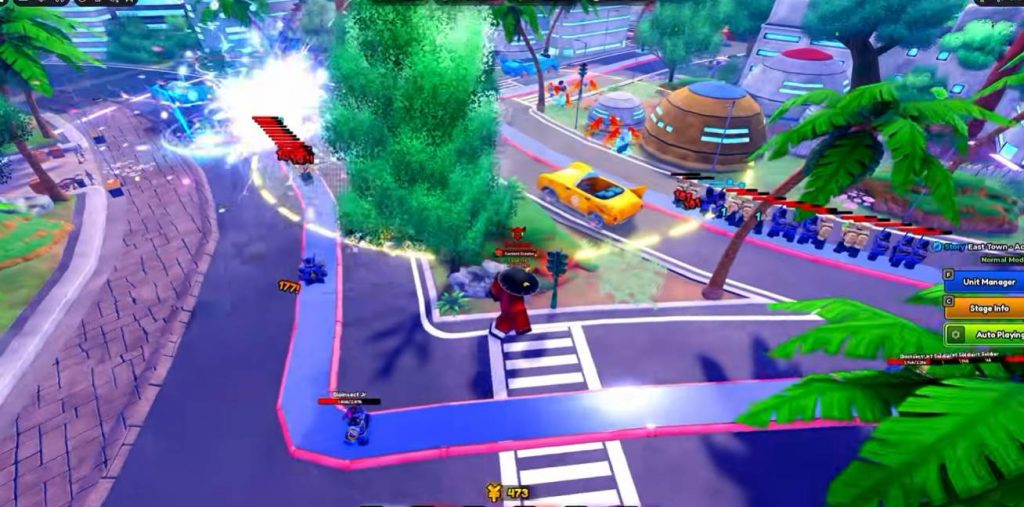
After preparing your team, choose the mode and map where you want to farm materials. There is no need to immediately choose the hardest content available.
The most important requirement is consistency. Your team needs to be strong enough to finish the selected map without failing while Auto Play controls the match.
This is especially important for AFK farming. A setup that can occasionally win but frequently loses will waste your time and materials. It is usually better to farm slightly easier content if it allows you to complete run after run without intervention.
Reduce Graphics for Better AFK Farming
Before starting a long farming session, lower your graphics settings. Running Roblox and Anime Expeditions with unnecessary visual effects can put additional load on your device or cloud setup.
Start by lowering Roblox’s graphics quality. You can also open the Anime Expeditions settings and reduce the game’s visual settings.
Recommended changes include:
- Set Roblox graphics quality to the lowest practical level.
- Enable Low Detail Mode.
- Disable Camera Shake.
- Turn off unnecessary visual effects.
- Reduce other settings that are not needed for farming.
These changes can help make the game run more smoothly and reduce the chance of performance problems during longer sessions.
Configure the Auto Play Placement Zone
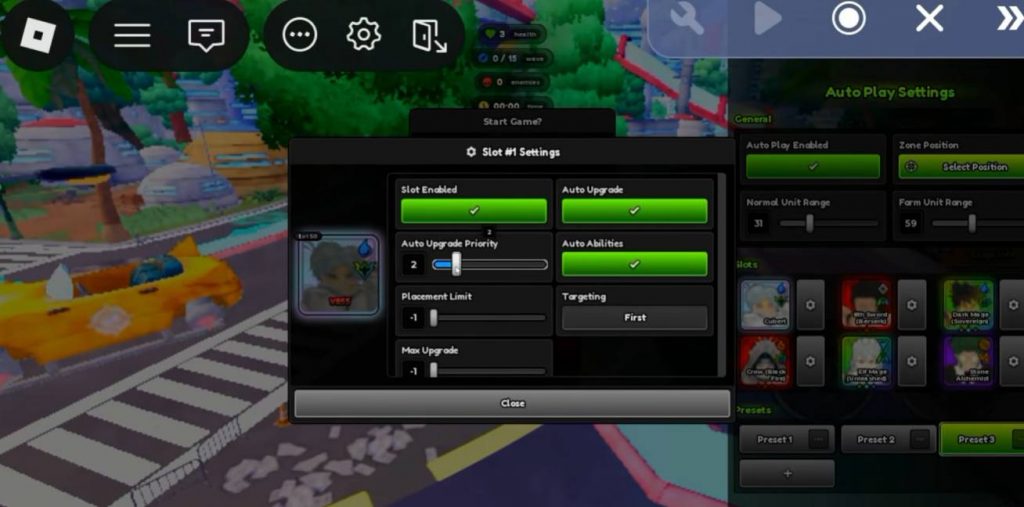
The new Auto Play system gives you control over how your units are placed. One of the first settings you should adjust is the placement zone.
Try placing the zone farther away from the enemy spawn point. This gives your farming unit more time to generate money before enemies reach your main damage dealers.
The exact position can depend on the map, so test your setup before leaving the game unattended. Your goal is to give your economy enough time to build while still allowing your damage units to deal with enemies efficiently.
Set the Placement Range
Placement range is another important Auto Play setting. A useful starting point is around 30 range for regular units and around 60 range for your farming unit.
This setup allows your main units to stay reasonably close together while giving the farm unit more flexibility when it is placed.
You should still adjust these numbers depending on the map and your team. Some maps may require units to be placed closer to the path, while others give you enough room to move the farm farther away.
Set Auto Place and Auto Upgrade
Auto Play can handle both unit placement and upgrades. Make sure these options are enabled for every unit you want the system to control.
You can also assign upgrade priorities to individual units. This is one of the most useful settings for AFK farming because you can tell the system which units should receive money first.
A simple priority setup could be:
- Priority 1: Farming unit.
- Priority 2: Main damage units.
- Priority 2 or higher: Other support and utility units depending on your strategy.
Your farm should generally receive early upgrades because it helps generate the money needed to build the rest of your team.
However, support units can also deserve a higher priority. If The Hero, for example, provides an important damage buff, upgrading it earlier can improve your team’s overall performance.
Enable Auto Abilities
Some units have active abilities, transformations, attacks, or buffs that can make a major difference during a match. Auto Play can activate these abilities automatically when the option is enabled.
Check each unit individually and turn on Auto Ability where appropriate.
This is especially useful for units whose value comes from repeatedly using their active skills. Without Auto Ability enabled, your team may lose a large amount of potential damage or utility while you are away.
Choose the Right Targeting
Targeting settings can also be adjusted for individual units. The best option depends on the role of the unit and the enemies on the map.
For most damage dealers, First or Strongest can work well. Crowd control units can usually use First so they focus on enemies approaching your base.
Some fast-attacking units may benefit from Shielded targeting on maps where enemies have many shields.
Before using your setup for a long AFK session, test the targeting to make sure your units are attacking the enemies you expect.
Save Your Auto Play Preset
Once you have configured your placement, upgrades, abilities, and targeting, save the setup as a preset.
This is useful if you regularly farm different maps or want to return to the same farming setup later. Instead of manually configuring every unit again, you can simply load the saved preset.
If you have several farming strategies, consider creating separate presets for different maps or modes.
Turn On Auto Start
Another important setting is Auto Start. Enable it in the main Anime Expeditions settings if you want the game to automatically begin another match after the previous one ends.
Without Auto Start, your character may finish one run and then simply remain idle.
With Auto Start enabled, the game can continue starting new matches, which makes the feature much more useful for long farming sessions.
Test the Setup Before Going AFK
Do not immediately leave your game unattended after setting everything up. Watch at least one complete run first.
During the test, check several things:
- Your farm unit is placed correctly.
- The farm is upgraded before unnecessary units.
- Damage units are placed in useful positions.
- Support units are close enough to provide their effects.
- Auto abilities activate correctly.
- Targeting works as expected.
- The team can defeat the final boss.
- A new match starts automatically.
If something goes wrong, change the placement zone, range, priority, targeting, or unit selection before starting a longer session.
Using an Auto Clicker for AFK Sessions
If you are using an external setup to keep the game active, the source method uses a small Auto Clicker macro to prevent Roblox from detecting prolonged inactivity. The macro is not intended to control unit placement or upgrades because Auto Play already handles those actions.
The basic idea is to record a very small input, such as opening chat or jumping, and repeat it.
However, keep in mind that third-party automation tools can interact with Roblox in ways that may be restricted or against a game’s rules. Use only methods that are permitted by Roblox and Anime Expeditions, and avoid automation that gives you an unfair gameplay advantage.
Why Auto Play Is Good for Material Farming
The biggest advantage of Auto Play is that you no longer need to manually place and upgrade every unit during every run.
Once the system is configured correctly, it can handle much of the repetitive work:
- Place units automatically.
- Upgrade units based on priority.
- Activate selected abilities.
- Follow your targeting settings.
- Restart matches with Auto Start.
- Continue farming the same content repeatedly.
This makes it much easier to farm materials while spending less time actively controlling each match.
Best Auto Play Setup for AFK Farming
For a simple setup, start with a balanced team that contains a farm unit, support, crowd control, and strong DPS units. Then configure the farm to have the highest upgrade priority.
A basic setup can look like this:
- Team: Farm + Support + Crowd Control + DPS.
- Farm range: Around 60.
- Regular unit range: Around 30.
- Farm priority: 1.
- Damage priority: 2.
- Auto Place: Enabled.
- Auto Upgrade: Enabled.
- Auto Abilities: Enabled for useful active skills.
- Targeting: Adjust based on each unit.
- Auto Start: Enabled.
- Low Detail Mode: Enabled.
- Camera Shake: Disabled.
- Unnecessary effects: Disabled.
These settings are only a starting point. Different maps and teams may require adjustments.
The new Auto Play feature gives Anime Expeditions players a much easier way to handle repetitive material farming. Instead of manually placing every unit and upgrading them during each run, you can create a preset that handles most of the work automatically.
The most important part is building a team that works well without complicated positioning. Put your farming unit at a high priority, use suitable placement ranges, enable Auto Abilities, select useful targeting settings, and turn on Auto Start for continuous runs.
Before leaving your setup unattended, always test one full match. If your team can reliably clear the map and restart automatically, you have a much more reliable material farming setup. For long AFK sessions, also make sure any automation or external tools you use comply with Roblox and the game’s rules.
Anime Expeditions