


How to Turn Crown of Rivals Into a Domino Crown in Roblox Guide
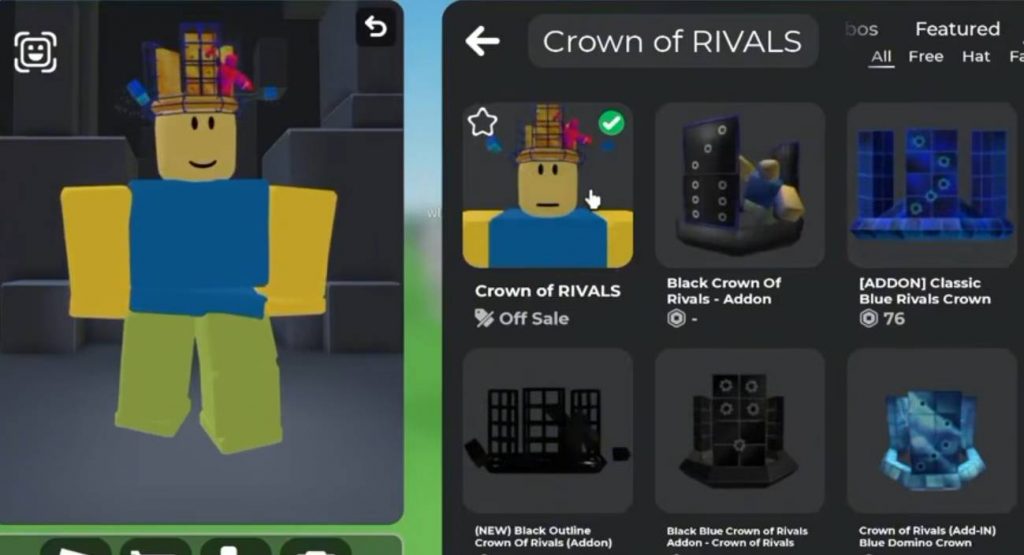
The Crown of Rivals in Roblox can be customized with different accessories to create a look similar to a Domino Crown. This method uses add-ons that work together with the Crown of Rivals, giving players several ways to change its appearance without replacing the main crown.
There are multiple add-ons available, including options that can give the crown a Domino-style design. You only need the Crown of Rivals and one compatible add-on to create the look.
What You Need
Before customizing the crown, make sure you have the Crown of Rivals equipped on your Roblox avatar. You will also need one of the available add-ons that can change its appearance.
The add-ons can be found through Catalog Avatar Creator, where you can preview different options before deciding which one fits your avatar. Some versions also come in different colors, including purple and gold.
How to Make the Crown of Rivals Look Like a Domino Crown
The process is quite simple and can be done through the avatar customization system. Follow these steps to create the Domino Crown look:
- Get the Crown of Rivals and equip it on your Roblox avatar.
- Open Catalog Avatar Creator.
- Search for add-ons designed for the Crown of Rivals.
- Browse through the available add-ons.
- Select one of the Domino-style add-ons.
- Equip the add-on together with the Crown of Rivals.
- Check your avatar preview to see the new appearance.
- Try different add-ons until you find the Domino Crown style you prefer.
Only one of these add-ons can be equipped at the same time, so you will need to choose the design you want to use. Removing the add-on will return the Crown of Rivals to its normal appearance.
Different Crown Add-Ons
One of the useful things about this customization method is that there are several add-ons to choose from. Instead of being limited to one design, players can experiment with different colors and styles.
Some options can create the classic Domino Crown appearance, while others provide different looks such as purple or gold variations. This makes the Crown of Rivals more flexible if you want to match it with a particular Roblox outfit.
You can preview the add-ons before using them, which makes it easier to compare the different designs. Since only one add-on can be equipped at once, simply switch between them to find your favorite.
Does It Cost a Lot of Robux?
The customization method does not require a large amount of Robux based on the information provided. The main cost depends on which Crown of Rivals add-on you decide to use. If you are trying to create the Domino Crown look on a budget, check the available add-ons in Catalog Avatar Creator and compare their prices before purchasing one. You can then equip the selected add-on with your Crown of Rivals.
Turning the Crown of Rivals into a Domino Crown is mainly about combining the original crown with the right avatar add-on. After equipping the Crown of Rivals, search Catalog Avatar Creator for compatible add-ons and test the different designs.
The Domino-style add-ons can give the crown a completely different appearance, while other options let you create purple, gold, and other variations. Since you can only use one add-on at a time, switching between them is the easiest way to find the style that works best with your Roblox avatar.
Available next action: Create a downloadable DOCX file here in this chat containing the editable prose above
Roblox