


Dota 2 Mobile Guide: Features, Gameplay, Download, and Safety
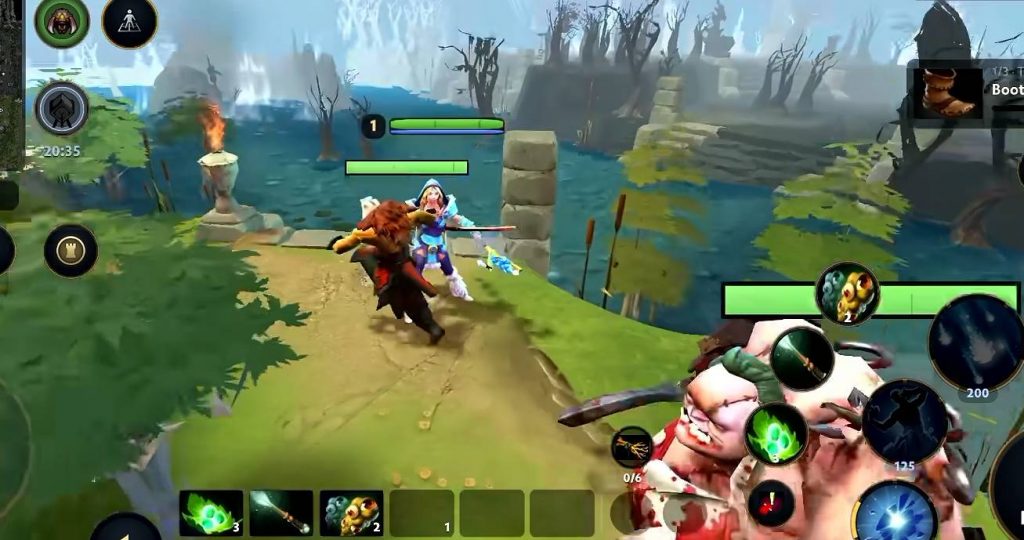
Dota 2 is one of the most popular PC MOBA games, known for its large hero roster, complex item system, and strategic gameplay. Now, a mobile version has appeared that attempts to bring a similar experience to Android devices.
Dota 2 Mobile features several elements that look familiar to players of the PC version, including heroes, skills, items, creeps, jungle monsters, and a similar map layout. It also appears to offer different game modes, such as bot matches, online battles, custom games, and sandbox practice.
However, the version discussed here appears to be a test or beta project, and its official status has not been verified. Before downloading it, players should understand its features, limitations, and potential security risks.
What Is Dota 2 Mobile?
Dota 2 Mobile is a project that attempts to bring Dota 2 gameplay to mobile devices. Based on the gameplay shown, it includes several mechanics inspired by the original PC game.
Players can select available heroes, use their abilities, purchase equipment, fight enemy creeps, and explore different areas of the map. The game also appears to include familiar features such as the fountain, jungle, towers, wards, runes, and courier system.
Several game modes are shown, including:
- Bot matches for practicing against computer-controlled opponents.
- Online matches for playing against other players.
- Custom games for creating or joining specific matches.
- Sandbox mode for testing heroes and practicing mechanics.
The available gameplay also shows options for one-on-one battles and matches with up to 10 players. Some matches can reportedly be joined using a room code.
Despite these features, the mobile version still has limitations. The available hero selection is smaller than the PC roster, the graphics are less detailed, and the touchscreen controls may require some practice.
Most importantly, there is no verified confirmation that this version is an official mobile port developed or supported by Valve.
How to Download Dota 2 Mobile
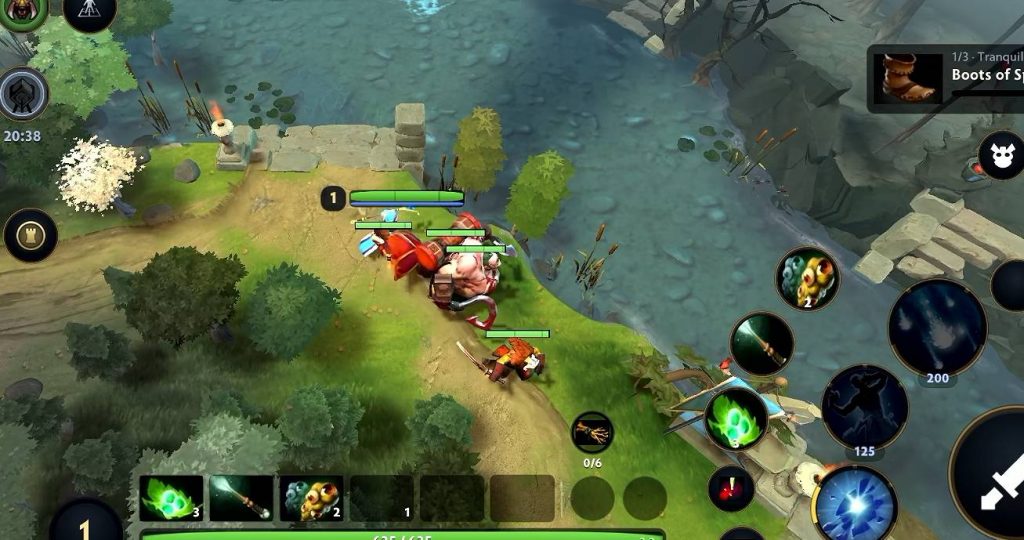
Players looking for Dota 2 Mobile should be careful when searching for an installation file. The version described here appears to be a test or unofficial project, and its authenticity has not been confirmed.
A third-party page mentioned in connection with the game is:
This link should not be treated as proof that the game is official or safe. Check the current page, developer information, and file details before deciding whether to proceed.
Before installing an APK, follow these precautions:
- Check the developer’s name and look for an official website or verified announcement.
- Search for an official Google Play Store listing, if one exists.
- Review the reputation of any third-party website offering the file.
- Scan the downloaded file with available security tools.
- Check the permissions requested by the application.
- Avoid entering your Steam password or other sensitive account details into an unverified app.
If the developer and file source cannot be verified, the safest choice is not to install the application. Dota 2 is officially available on PC through Steam, which remains the more reliable option for players who want the supported version.
Dota 2 Mobile Features and Gameplay
Although the mobile project is not verified as an official release, its gameplay shows several systems that resemble the PC version. Here are the main features demonstrated.
1. Online Matches and Bot Mode
Dota 2 Mobile appears to offer several ways to play. Beginners can start with bot matches to learn the basic controls and understand how heroes use their abilities.
Players can also try online matches and custom games. The displayed options include one-on-one battles and matches with up to 10 players.
A room-code feature is also shown, allowing players to join certain matches using a code.
However, these features may not always work as expected. Since the project’s status and server support have not been verified, online availability may change or become unavailable.
2. Limited Hero Selection
The mobile version features a selection of heroes inspired by Dota 2. Heroes shown in the gameplay include Crystal Maiden, Invoker, and Pudge, along with several other characters.
Each hero has abilities that can be used during a match. Players can inspect their skills and choose a hero that fits their preferred playstyle.
Invoker is particularly interesting because of his complex ability system. Players must combine three elemental orbs to create different spells, requiring practice and quick inputs.
On a touchscreen, managing these combinations may be more difficult than using a keyboard and mouse. Beginners may find it easier to start with heroes that have simpler abilities before trying more complicated options.
3. Item Shop and Quick Buy
The item system is another feature that resembles the PC version. The gameplay shows different equipment categories, including basic items, magic items, armor, accessories, and boots.
A quick-buy feature is also displayed. This allows players to select items they want to purchase and access them more easily when they have enough gold.
Other familiar mechanics shown include selling items, teleportation, and using a courier to deliver equipment to a hero.
These systems can help experienced Dota 2 players feel more comfortable with the gameplay. However, players should still check the available items and controls because the mobile interface may differ from the PC version.
4. Map, Jungle, and Creep Mechanics
The map contains several elements similar to the original Dota 2 experience. These include lanes, jungle areas, towers, the fountain, and locations where jungle monsters appear.
The gameplay also shows familiar mechanics such as:
- Last hitting creeps to earn gold.
- Denying creeps to limit the enemy’s resources.
- Placing wards to gain vision.
- Collecting runes for additional effects.
- Cutting trees to open or change paths.
- Using fortification to protect towers.
These mechanics are important parts of Dota 2 because they affect farming, map control, and team strategy.
Players who already understand the PC version may recognize many of these systems. New players should take time to learn what each mechanic does before attempting more challenging matches.
5. Joystick and Tap Controls
Since the project is designed for mobile devices, it uses touchscreen controls rather than the traditional keyboard-and-mouse setup.
A virtual joystick can be used to move the hero, while other buttons allow players to activate abilities and interact with the game.
The gameplay also shows a tap-based control option. This may be more comfortable for some players, especially those using tablets or devices with larger screens.
However, precise movement and skill aiming can still be challenging. Heroes that require fast reactions or complex ability combinations may take longer to master on a touchscreen.
6. Graphics and Camera Controls
The map and game elements resemble the PC version, but the visual quality appears lower. Some textures look less detailed, and certain animations may not run smoothly in the gameplay shown.
Players can also zoom the camera in or out to adjust their view during a match.
Lower-quality graphics may help a game run on mobile hardware, but actual performance depends on the device and how well the project is optimized.
Since the version’s development status is unclear, players should expect possible visual issues, performance problems, or unfinished features.
Is Dota 2 Mobile Safe to Play?
The safety of this Dota 2 Mobile project cannot be confirmed based on gameplay footage alone. Its developer, installation source, permissions, and server infrastructure all need to be verified.
Dota 2 for PC is developed by Valve, but this does not mean every mobile project using the Dota 2 name is official or supported by Valve.
There are several risks to consider before installing an unverified application.
- Malware: APK files from unreliable sources may contain harmful software.
- Account security: An unverified app could expose login details if you enter your Steam credentials.
- Privacy: Some applications may request permissions unrelated to their main functions.
- Stability: Test versions may crash, contain bugs, or lose saved progress.
- Server availability: Online features may stop working if the project’s servers are unavailable.
To reduce these risks, avoid downloading files from unknown sources and do not provide sensitive account information to an unverified application.
If you want to play the official version of Dota 2, download it through Steam. This is the safer choice for accessing the game supported by Valve.
Is Dota 2 Mobile Good for Beginners?
The mobile project may provide a way to explore some Dota 2 mechanics, particularly for players who want to learn about heroes, items, and the general map layout. Bot matches and sandbox mode can be useful for practicing without immediately facing competitive opponents.
Crystal Maiden may be a reasonable hero to try when learning basic skill usage, while Invoker is better suited to players who are ready to practice more complicated ability combinations.
However, the experience may differ considerably from the PC version. The available heroes, controls, performance, and online features may not match the original game.
Players who want to learn Dota 2 seriously should use the official PC version when possible, as it provides the established gameplay experience and supported online environment.
Dota 2 Mobile shows several features that resemble the PC game, including hero abilities, item purchases, courier deliveries, wards, runes, jungle monsters, and familiar map mechanics. The displayed gameplay also includes bot matches, online play, custom games, and sandbox practice.
However, its official status remains unverified, and the version shown appears to have limitations in its hero selection, graphics, and touchscreen controls.
Before downloading it, check the developer and installation source carefully. Do not assume that an app is official simply because it uses Dota 2’s name or gameplay elements, and never enter your Steam credentials into an unverified application. For players who want the authentic Dota 2 experience, the official PC version available through Steam remains the recommended option.
Dota 2 Mobile