


Pixel Z Guide – Codes, Best Characters, Controls, and Tips for Beginners

Pixel Z is a Roblox fighting game featuring fast-paced 2D combat with pixel-art graphics. Players can choose different fighters, perform combos, charge their Ki, transform during battles, and unleash powerful ultimate attacks. There are around 40 characters to unlock, giving you plenty of options to find a fighter that matches your playstyle.
Besides fighting other players, you can battle NPCs, improve your Elo, and climb through the competitive ranks. However, learning the controls and understanding how combos work are important if you want to win more matches. This Pixel Z guide covers the available codes, character recommendations, controls, and useful tips for beginners.
All Active Pixel Z Codes
Redeeming codes is one of the easiest ways to get extra resources in Pixel Z. The rewards include Coins and other packs that can help you unlock additional fighters. Based on the available information, there are two working codes you can try:
- 15KOMG – Free rewards.
- BACK – Free rewards.
Enter both codes through the Codes menu and collect the rewards if they are still available. Codes can expire, so make sure to redeem them as soon as possible.
How to Redeem Pixel Z Codes
Before spending time unlocking characters through regular gameplay, make sure you have claimed the available codes. The process is simple and can be completed from the game’s menu. Follow these steps:
- Launch Pixel Z through Roblox.
- Open the Codes section from the menu.
- Enter one of the active codes into the text box.
- Press the redeem button to claim your rewards.
- Repeat the process with the other available code.
The rewards can include Coins and packs that help you obtain new fighters. In the gameplay example from the source, redeeming codes unlocked Piccolo and Kefla.
Best Characters in Pixel Z
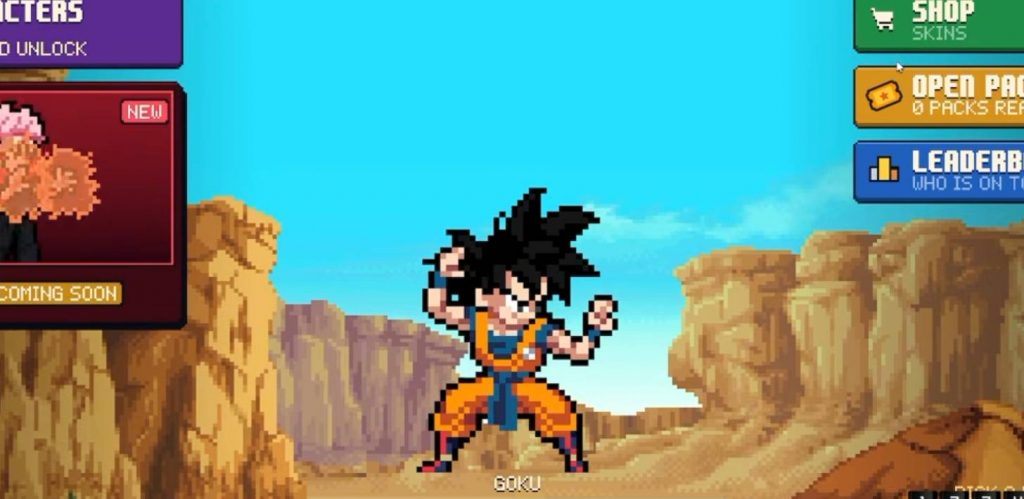
Pixel Z features a large character roster, with around 40 fighters available to unlock. Each character has different abilities, attacks, and ultimate moves, so choosing the right fighter depends on how you prefer to play.
There is no single character that everyone must use, since personal preference and combat style also matter. However, Goku Blue is one of the recommended fighters because of his overall performance in battles.
Here are some things to consider when choosing your character:
- Goku Blue: A recommended option for players looking for a strong fighter to use in regular battles.
- Piccolo: One of the characters you may obtain through the rewards from codes.
- Kefla: Another fighter that can be unlocked through the available code rewards.
Try different characters instead of immediately sticking to the first one you unlock. Learning their attacks and special abilities will help you understand which fighter suits your combat style.
All Pixel Z Controls
Pixel Z has several controls for attacking, moving, charging Ki, and using special abilities. If you forget a particular key, you can open the Settings menu and check the Controls section.
It is worth spending some time learning the controls before entering competitive matches. Knowing which buttons perform specific attacks will make it easier to create combos and respond to your opponent.
You can also open the List of Moves from the menu to check the available attacks for your selected character. For example, the Demon Shocker move uses the Q, D, and J inputs for a ground attack, according to the provided gameplay information.
Since different fighters have their own special moves and ultimate attacks, make sure you check their move lists instead of assuming every character uses the same abilities.
How to Perform a Dramatic Finish in Pixel Z
A Dramatic Finish is a special finishing sequence that can make the end of a fight more cinematic. However, you cannot activate it with any character or on every map.
To perform a Dramatic Finish, you need to use the correct fighters and battle on a compatible map. Once those requirements are met, finish the opponent with a Heavy Attack.
If the finishing sequence does not activate, check whether your selected characters and current map support the feature. Simply using a Heavy Attack is not enough if the other requirements have not been met.
How to Make Combos and Combo Lock Opponents
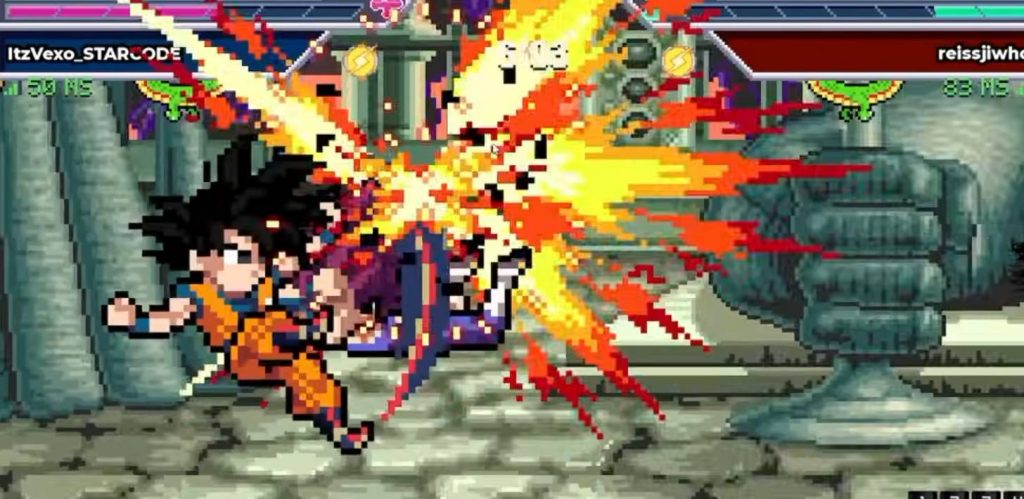
Combos are one of the most important parts of Pixel Z’s combat system. Instead of using random attacks, you should learn how to connect your moves and keep your opponent from escaping.
A successful combo can deal significant damage while giving your opponent very little time to respond. The goal is to connect attacks smoothly and continue applying pressure without leaving yourself open to a counterattack.
Here are some tips for improving your combos:
- Learn the basic attack combinations before trying advanced moves.
- Practice connecting different attacks without leaving gaps.
- Use repeated combos to keep opponents under pressure.
- Pay attention to your opponent’s movement and avoid predictable attacks.
- Learn when to stop attacking and defend yourself.
- Understand how each character’s special moves fit into your combos.
Combo locking is useful when you can consistently connect attacks and prevent your opponent from responding. However, experienced players may recognize repeated patterns, so avoid relying on only one combination throughout every match.
Practice in Training Mode Before Fighting Players
If you are new to Pixel Z, Training Mode is one of the best places to improve your skills. Instead of immediately entering competitive matches, spend time practicing your attacks against training opponents.
You can experiment with different combinations, learn how to use special moves, and understand how your character behaves during combat. This is also a good opportunity to test your Ki abilities and transformations without worrying about losing Elo.
Try practicing the same combo several times until you can perform it consistently. Once you become comfortable with the basic attacks, start combining them with other moves to create longer attack sequences.
Before entering a real match, make sure you understand the important moves available to your character. A little practice can make a noticeable difference when fighting experienced players.
How Ki and Transformations Work
Ki is another important part of Pixel Z’s combat system. During battles, your Ki increases as you fight, giving you access to abilities and transformations that can change how you approach combat.
Do not focus entirely on basic attacks. Learn how to charge and use your Ki while combining it with your character’s regular moves. Understanding when to activate your abilities can help you put more pressure on opponents.
Each character also has special ultimate attacks. You can check these abilities through the List of Moves menu, allowing you to learn what your fighter can do before entering a match.
How to Increase Your Elo in Pixel Z
Pixel Z includes a competitive ranking system where your Elo changes depending on match results. Winning battles increases your Elo, while losing causes it to decrease.
If you want to climb the leaderboard, you need to become more consistent rather than relying on luck. Learning combos, understanding your character, and practicing your defensive options will help you perform better against other players.
Here are some tips for improving your Elo:
- Practice your combos before entering ranked matches.
- Learn the strengths and weaknesses of your selected fighter.
- Avoid repeating the same attack pattern against every opponent.
- Pay attention to your Ki and use special abilities at the right time.
- Try to avoid getting trapped in your opponent’s combos.
- Focus on consistent wins instead of rushing through matches.
Remember that losing matches can lower your Elo. If you are struggling against other players, return to Training Mode and work on the areas where you need improvement.
Beginner Tips and Tricks for Pixel Z
Pixel Z may look simple at first, but its combat system has several mechanics that take time to understand. Learning the controls, mastering combos, and knowing when to use special attacks are all important if you want to become a better fighter.
Here are some additional tips for beginners:
- Redeem all available codes to collect free Coins and packs.
- Try different fighters before deciding which one to main.
- Consider Goku Blue if you want to start with a recommended character.
- Check the Controls menu whenever you forget a key combination.
- Use the List of Moves to learn each character’s special attacks.
- Practice combos in Training Mode before entering real matches.
- Learn how to combo lock opponents without becoming predictable.
- Understand how Ki works and when to use transformations.
- Check the requirements for Dramatic Finish before attempting one.
- Focus on improving your combat skills before climbing the Elo leaderboard.
Pixel Z offers plenty of ways to enjoy its fast-paced fighting system, whether you prefer practicing combos, unlocking new characters, or competing against other players. With around 40 fighters to collect, there are many different abilities and combat styles to explore.
For beginners, the best approach is to redeem the available codes, learn the controls, and spend time in Training Mode. Once you understand how combos, Ki, transformations, and special attacks work, you will be better prepared to fight stronger opponents and climb the Elo ranks.
Pixel Z