


All 25 Duck Locations in Family Zone – Duck-O-Lantern UGC Guide
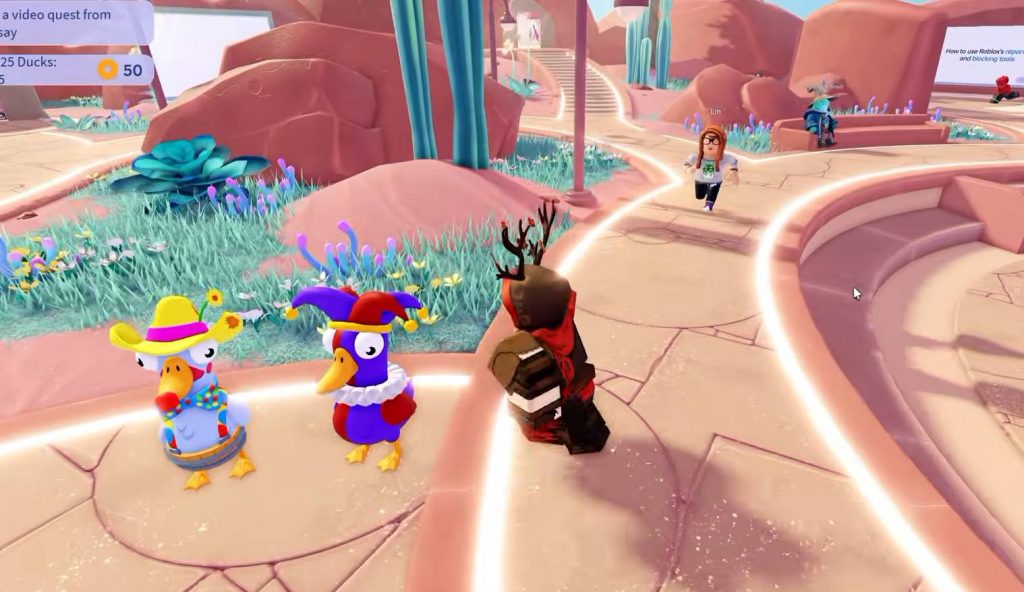
Roblox players can unlock the Duck-O-Lantern UGC item in Family Zone by completing a series of Halloween quests. The first task requires you to find 25 hidden ducks scattered across the map. After collecting them all, you must visit Duck Duck and complete additional gameplay objectives.
Finding every duck can take some time because they are hidden near trees, rocks, portals, and other landmarks. This guide lists all 25 duck locations in Family Zone and explains how to unlock the Duck-O-Lantern UGC item.
All 25 Duck Locations in Family Zone
Before searching for the ducks, enter Family Zone and speak to the Nerba NPC. Complete the Halloween quest dialogue to start the duck-hunting objective.
You can then explore the map and collect the 25 ducks listed below.
Duck Location 1
After speaking to Nerba, walk down from the spawn platform using the stairs. Look to your left near the area beside the stairs to find the first duck.
Duck Location 2
Return to the spawn platform and head toward the blue flower growing at the base of a rock. You will find a red, glowing duck to the right of the flower.
Duck Location 3
From the spawn platform, walk around to the back. Look for an orange duck with butterfly wings standing nearby.
Duck Location 4
Look toward the spawn platform and find the nearby cactus. Check around the base of the cactus to collect the silver duck.
Duck Location 5
Head toward the Duck Duck portal. Look for a large tree to the left of the portal, then check the right side of its trunk to find another duck.
Duck Location 6
From the large tree in Location 5, move around to its left side. Search near the base of a rock to find a white duck.
Duck Location 7
Go to the large video screens near the Duck Duck portal. Look to the left side of the screen to find a glowing blue duck.
Duck Location 8
Across from the large video screen, look for a street lamp. A small rock sits behind it, with a Frankenstein-themed duck hiding nearby.
Duck Location 9
Head toward the Halloween Zone near the Sesame Street: Magical Bestie Quest portal. Go behind the purple curtain and search between a plant and a tree trunk for a duck wearing a yellow outfit and hat.
Duck Location 10
Visit the Avatar Store and walk behind the area. Look between the rocks to find a duck dressed as a police officer.
Duck Location 11
Find the Within Reach Teleport Portal. Check the base of the cactus growing to the left of the portal to collect the next duck.
Duck Locations 12, 13, and 14
Three ducks can be found around the Trivia area.
- Duck 12: Inside the Trivia play area, wearing a cowboy hat.
- Duck 13: Near the video screens, wearing a wizard’s hat.
- Duck 14: Also near the video screens, dressed as a vampire.
Collect all three before moving to the next area.
Duck Location 15
Travel to the Roblox 101 Teleport Portal. Look for a tree on the right side of the portal platform and check its base for a duck wearing a wolf costume.
Duck Locations 16 and 17
From the Roblox 101 Teleport Portal platform, look to your left. You will find two ducks standing together near the base of a rock.
Duck Location 18
Go to the Parental Controls Setup screen. Search around the base of a nearby rock to find a yellow duck that appears to be dancing.
Duck Locations 19 and 20
Find the Play Together portal, which is located to the left of the Parental Controls Setup screen.
- Duck 19: Behind the Play Together portal.
- Duck 20: In front of the portal, wearing a bee costume.
Make sure to check both sides of the portal before leaving.
Duck Location 21
From the Play Together portal, look to your left for a giant screen. Jump onto the top of the screen to collect the duck waiting there.
Duck Location 22
After collecting Duck 21, look for a large tree nearby. Go behind the tree and search at the base of its trunk for a glowing green duck.
Duck Locations 23 and 24
Return to the spawn area and walk down the platform stairs. Two ducks wearing joker costumes are standing directly in front of you.
Collect both ducks to finish this part of the search.
Duck Location 25
Head to the area near spawn that contains portals to multiple games. Find the Better Block Teleport Portal and walk behind it to discover the final duck, which is dressed as a firefighter.
Once you have collected all 25 ducks, you can move on to the remaining Halloween quests.
How to Get the Duck-O-Lantern UGC in Family Zone
Finding all 25 ducks is only the first requirement. You must also complete several objectives in Duck Duck before claiming the Duck-O-Lantern UGC item.
Follow these steps:
- Find all 25 ducks: Complete the duck-hunting quest in Family Zone.
- Travel to Duck Duck: Use the Duck Duck portal in Family Zone to enter the game.
- Play for 30 minutes: Spend at least 30 minutes playing Duck Duck.
- Complete 10 games: Finish 10 games of Duck Duck to complete the additional objective.
- Return to Family Zone: Once all quests are complete, go back to Family Zone.
- Visit the Halloween Zone: Find the Duck-O-Lantern UGC item and interact with it to add it to your inventory.
Make sure you have completed every objective before returning to the Halloween Zone. If the item does not become available, check your quest progress to see whether any requirements remain unfinished.
Collecting all 25 ducks in Family Zone is the first step toward unlocking the Duck-O-Lantern UGC item in Roblox. The ducks are scattered around important landmarks, including portals, trees, rocks, video screens, and the spawn area.
After finding every duck, play Duck Duck for 30 minutes and complete 10 games. Then return to Family Zone, visit the Halloween Zone, and interact with the Duck-O-Lantern UGC item to claim your reward.
Family Zone