


How to AFK Overnight for Gems in Anime Origins Guide!
Anime Origins gives you plenty of ways to earn Gems, but farming them manually can become repetitive, especially when you want to collect a large amount over several hours. One option is to set up an AFK macro that repeatedly runs a stage, completes the match, and starts another run automatically.
This method uses the game’s built-in automation settings together with a simple macro tool. Once everything is configured correctly, you can leave the game running for an extended period and return later to collect the rewards.
Anime Origins AFK Settings
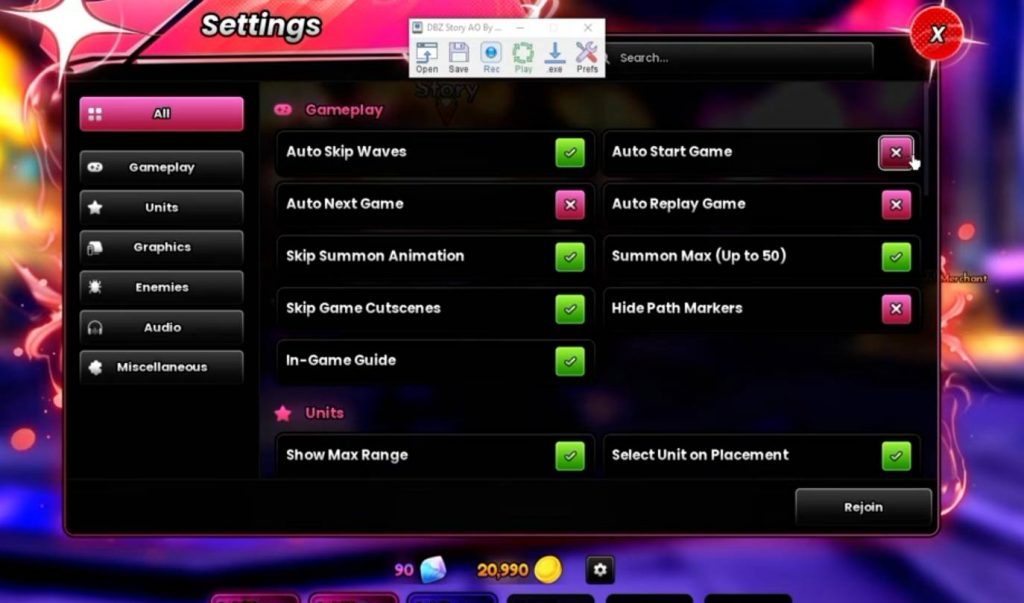
Before starting the macro, you need to configure several settings in Anime Origins. These settings help the game handle important parts of the match automatically. Recommended settings include:
- Auto Skip: On.
- Auto Replay: On.
- Phantom Placement: On.
- Auto Upgrade on Placement: On.
- Auto Start: Optional.
- Game Speed: 1x or 2x.
Auto Replay is particularly important because the game needs to automatically start another run after the current match finishes. Without it, your macro may stop after completing a single stage. Auto Start is optional. If your macro already knows how to continue into another match, you can leave it disabled. Otherwise, enabling it can make the process more consistent.
Choose a Team for AFK Farming
You do not necessarily need a specific team to use this method. The main goal is to have enough damage to consistently clear the stage without manual intervention. A basic AFK team can include:
- One farming unit for additional income.
- Main DPS units for clearing enemies.
- A healer, if your team needs additional survivability.
- Ground units for normal placement.
- Hill units when the map requires elevated placement.
The exact units are less important than making sure your team can reliably finish the selected stage. If your team struggles to survive or clear later waves, the macro will not be effective because the run may fail.
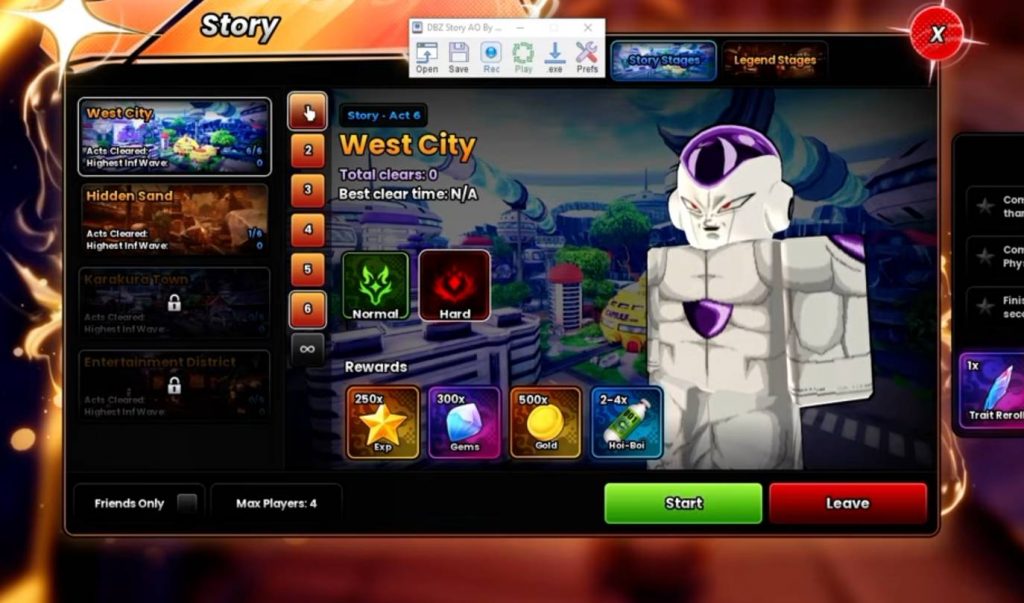
Select West City
For this method, head into West City, which is the first map mentioned in the setup. You can choose the Act that works best for your team.
Normal or Hard difficulty can be considered depending on your roster. The important thing is to select a difficulty that your team can consistently clear without requiring manual intervention.
If your team cannot reliably complete Hard mode, Normal mode is usually the safer choice for an overnight setup. A consistent clear is more useful than choosing a harder stage that occasionally fails.
Set Up Your Camera
Camera position is one of the most important parts of this macro setup. Once you begin recording your movements, you should avoid changing the camera angle.
Before starting the run:
- Enter the selected West City stage.
- Zoom the camera out as far as possible.
- Keep the camera at the chosen angle.
- Avoid moving the camera with your mouse.
- Use W, A, S, and D to move your character if needed.
- Walk toward the starting area.
- Position yourself where the macro will begin interacting with the stage.
Keeping the same camera position helps ensure that the recorded mouse movements continue to hit the correct buttons during future runs.
Record the Macro
Once your game settings and camera are ready, start recording your macro. Move your character to the required position and wait for the stage’s start button or interaction prompt to appear. Click it while the macro is recording so that the same action can be repeated later. The basic process should look like this:
- Enter West City.
- Choose your preferred Act.
- Start the stage.
- Allow your team to automatically place and upgrade units.
- Let the match finish.
- Allow Auto Replay to start another run.
- Repeat the process.
Keep the macro speed reasonable. A playback speed around 1x or 2x is recommended so the recorded actions have enough time to register correctly.
Keep the Camera Completely Still
One of the biggest things to remember when using a recorded macro is to avoid moving the camera after the recording is finished. If your recording depends on specific mouse positions, changing the camera can cause the macro to click somewhere different from where it was originally recorded. This can prevent the stage from starting correctly or interfere with other actions. For that reason, zoom out before recording and leave the camera alone afterward.
Make Sure Auto Replay Works
Auto Replay is essential if your goal is to leave Anime Origins running for a long period. When the match ends, the game needs to automatically start the next run. Test this before leaving the game unattended.
Complete one match and check whether the following run starts automatically. If it does not, check the game’s automation settings and look for the Auto Start option.
You can enable Auto Start if necessary, although it may not be required if your macro already clicks the Continue button correctly.
How the Gem Farming Method Works
The basic idea behind this method is simple. Instead of manually starting every match, you configure Anime Origins to handle the repetitive parts automatically while the macro performs the remaining interactions.
Your team handles the combat, while Auto Skip, Auto Upgrade, Phantom Placement, and Auto Replay reduce the amount of manual input required.
After each successful run, you receive the stage rewards and begin another match. Over several hours, these repeated clears can add up to a substantial number of Gems.
The exact number of Gems you earn will depend on the stage, difficulty, clear time, and how long you leave the setup running.
Test Everything Before Leaving It Overnight
Do not immediately leave the macro running for several hours without testing it first. Run through the entire process manually and make sure every action works correctly. Check that:
- The stage starts correctly.
- Your units are placed automatically.
- Auto Upgrade works.
- Your team can survive every wave.
- The match finishes successfully.
- Auto Replay starts the next run.
- The macro presses the correct buttons.
- The camera remains in the correct position.
A short test run can prevent the macro from stopping after just one match because of a missed click or incorrect setting.
An AFK setup can make Gem farming in Anime Origins much easier when you have a team that can consistently clear the chosen stage. The key is to configure Auto Skip, Auto Replay, Phantom Placement, and Auto Upgrade correctly, then record a simple macro that handles the remaining repetitive actions. West City is a straightforward option for this setup, but the most important factor is consistency. Choose a difficulty your team can clear reliably, keep the camera fixed, test the macro first, and make sure Auto Replay works before leaving the game running for an extended period.
Anime Origins